Count first, decide second
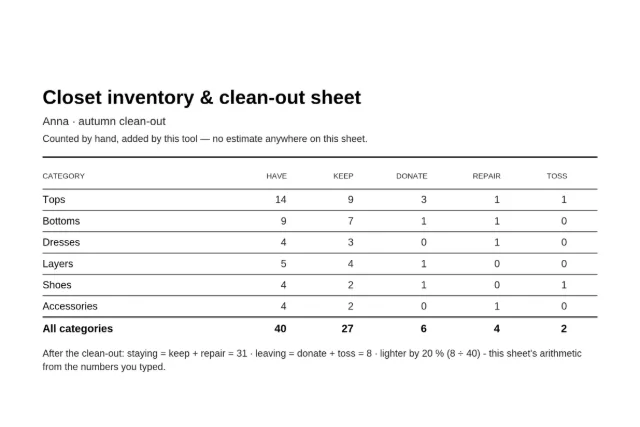
A closet clean-out fails when it starts with decisions. Pulling everything out and judging piece by piece is an afternoon’s energy spent on willpower, and the closet refills the same way. The order that works is the boring one: count first, decide second. Counting takes one walk along the rail — this sheet keeps you honest by making the count the input and the decision a separate column.
The six categories match the capsule wardrobe checklist, on purpose. Count your closet here, then generate a capsule checklist there, and the two sheets answer the only question that matters before any shopping: what do I actually own, and what is actually missing? If you want the week-after plan, the weekly outfit planner takes it from there.
The full walk-through — the order that works, the six questions explained, and what to do with each leaving pile — is in the guide How do you clean out your wardrobe?.
What the tool computes, and what it does not
The tool adds. It sums your counts, sums your triage, divides leaving by counted for the percent lighter, and states each formula on the sheet in plain words. It does not estimate, does not scan your closet, does not know your climate or your calendar, and has no opinion about how many shoes is too many — the count is yours, and the tool’s only job is to keep the arithmetic honest while you work.
The six keep-or-go questions printed at the bottom are the classic clean-out test: does it fit the body I have now, was it worn in the last 12 months, is it comfortable all day, is the repair cheaper than a replacement, is it not a duplicate, would I buy it again today. A piece that fails most of them belongs in the donate or toss column; the sheet leaves the verdict to you.
Everything on this page runs in your browser: no account, no upload, nothing stored. The tool is part of the fashion hub, where the wardrobe printables collect.
Questions
How does the math on the sheet work?
Everything is addition of the numbers you type. Staying = keep + repair. Leaving = donate + toss. The percent lighter is leaving ÷ counted, rounded to a whole percent — for a 40-piece closet with 8 leaving, that is 20 %. Wear-ready now counts the keep pile only, because repaired pieces are not wearable until they come back. The formula is printed on the sheet, so anyone reading it can check it.
What if I triage more pieces than I counted?
The page tells you which category does not add up, in plain words. The sheet still prints exactly what you typed, with the same warning printed under the math line — this tool does not silently fix or hide your numbers; it adds them and shows its work.
Why six categories?
The same six the capsule wardrobe checklist plans with — tops, bottoms, dresses, layers, shoes, accessories — so a counted closet compares directly against a planned capsule. If a category is not part of your wardrobe, leave it at zero; the row still prints, so the sheet stays honest about what was counted.
Is the sheet really free to print?
Yes. One page, A4 or US Letter, black on white, no watermark, no account, no email address. The PDF is built on your device, and the print button uses your browser's own print dialog.
Is anything uploaded from this page?
No. The counts, the notes, the math and the PDF are all computed inside your browser. No account, and no request carries anything you typed.
Can I use it for a laundry or repair pile?
Yes — that is what the notes line per category is for. Type what the note should say next to each category (for example 'repair pile: 2 jeans, 1 boot heel'), and it prints on the sheet as your own words.