A drawer of photos — on your phone, in a shoebox, still on negatives — is a drawer of gifts waiting to be made. Every gift on this page is made in your browser, printed on your own printer, and costs nothing but paper and ink: no account, no upload, no watermark.

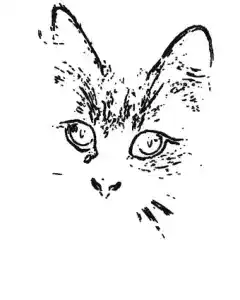

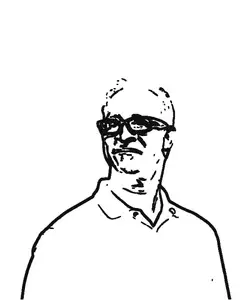
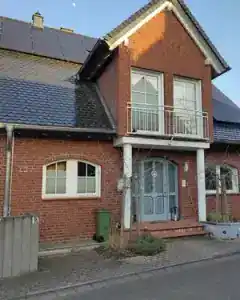
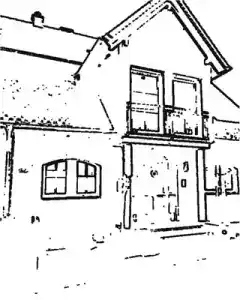
Real photos turned into coloring pages by the photo to coloring page tool — its actual output, made in the browser. Every pair took seconds.
What can I make from my photos, and for whom?
| For | The gift | Made with |
|---|---|---|
| Grandkids | a coloring page of themselves, the dog, the old house — or a whole book | Photo to Coloring Page |
| Grandparents | their own wedding or childhood print, colour revived, framed | Faded Photo Color Restorer |
| Anyone with a shoebox | pictures trapped on negatives, brought out and printed | Negative to Positive |
| Friends and parties | many photos joined into one tidy PDF album | Images to PDF |
| Anyone at all | prints sized exactly for the frame | Image Resizer |
| Anyone wrapping presents | gift tags with your photo inside, typed to and from — eight to a sheet (the photo gift tags guide walks the print arithmetic) | Photo Gift Tags |
| The year that just ended | a one-page year-in-review card around one photo — the year at the top, the best moments on lines to fill in | Photo Year in Review |
| The party itself | bunting — your photos and a name on printable flags, four to a sheet | Photo Bunting |
| The grandchildren’s visit | a memory game — every photo twice, shuffled onto printable cards | Photo Memory Game |
How do I make a photo banner with my own photos?
Drop a few photos into the photo bunting maker and type the name or message: every photo becomes a flag — triangle, rectangle or scalloped, your choice — with the picture inside, every character becomes a letter flag between them, and a space becomes the blank flag that marks the word gap. Four flags print per A4 or Letter sheet at true size — 92 × 122 mm each — with a solid cut outline, a dashed fold line over the string and two punch marks per flag (computed from the tool’s layout, October 2026).
The string math prints on the last sheet of the PDF: each flag takes 9.2 cm of string, 3 cm between flags, 15 cm at each end to tie — so eight flags need about 1.2 m of ribbon or twine. The same flags hang at a birthday (a 1st birthday with one photo a month is the classic), a graduation with school pictures in them, or any party wall.
The full walk-through — photo sizes, the computed sheet and string math for your own banner, assembly and damage-free hanging — is the guide How to make a photo banner with your own photos.
How do I make a coloring book from family photos?
- Pick photos with one clear subject on a plain background — a face in even light, a pet looking at the camera, a single house. Busy scenes turn into dense line networks; if that happens, move the Detail slider left and only the strongest lines stay.
- Drop each photo into the photo to coloring page tool and print it as a single page — free, unlimited, no account. Put a title line on the sheet: “For Grandma”, a name, a birthday.
- For many pages, the site’s Coloring Book Pack turns up to 20 photos into one print-ready PDF: a cover with your title, one numbered coloring page per photo, and a printing-tips page at the end. Twenty photos make a 22-page book — computed, not estimated, from the tool’s page assembly (September 2026). The pack costs €7 once; the single pages stay free and unlimited, as always.
One honest note: the tool draws the true outline of your photo — classic edge detection, not a smooth AI redraw. For a child’s crayon that is usually the better trade, because the picture that comes out is the picture you gave.
How do I make a memory game with my own photos?
Drop 6 to 12 photos into the photo memory game maker and each one becomes a matching pair of cards — shuffled, laid out on printable sheets, a cut line around every card, and a uniform back sheet so the photos stay hidden while the cards lie face down. Print at 100 percent, cut, deal: a real game from your own pictures in minutes.
The sheet math, computed from the tool’s layout (September 2026) — 12 square cards per A4 or Letter sheet, 3 across and 4 down:
| Photos (pairs) | Cards | Sheets |
|---|---|---|
| 6 | 12 | 1 |
| 8 | 16 | 2 |
| 12 | 24 | 2 |
Our suggested starting sizes, not a rule: ages 3–4 are happy with 6 photos, ages 5–6 with 8, ages 7 and up with the full 12 — every child is different, and the best game is one they finish. And because a memory game is usually made from photos of children: the whole thing runs in your browser, and no photo is uploaded anywhere. The full walk-through — which photos make strong pairs, the print settings that decide whether the game works, and the honest buy-it-or-print-it comparison — is the guide How to make a memory game with your own photos.
The photos are old, faded or on negatives — can I still give them?
Yes — and you should, because old photos are the gifts that get kept. The fixes are measurements, not guesses: colour negatives carry an orange mask that is read separately in red, green and blue before inverting, and prints from the 1960s to 1980s turned orange because the cyan dye layer fades first — the restorer measures how far each colour drifted and slides it back.
The fix steps, the how and the honest limits, are on one page: How to restore old family photos, step by step. Fix first, gift second.
How do I print photo gifts at home?
- Print at 100 % — in the print dialog choose “actual size”, never “fit to page”, or everything below shrinks slightly.
- For a full-sheet gift — a coloring page, a framed print — set the photo to A4 at 300 DPI: 2480 × 3508 pixels. The image resizer’s A4 preset does it in one click; the frame-size print table lives on the restoration page.
- For small gift prints, two 4 × 6 in photos (101.6 × 152.4 mm each) fit side by side on one A4 sheet — 203.2 mm of the 210 mm width, 152.4 mm of the 297 mm height. A second row would need 304.8 mm and the sheet has 297 mm, so it is two per sheet, then cut. (Arithmetic: inches × 25.4; computed September 2026.)
- Paper: any office paper works for crayons and pencils; use thicker paper for markers or watercolours so the ink does not bleed through.
- Binding a book: staple the left edge, or punch two holes and tie them with a ribbon — the pack’s own printing-tips page at the end of the PDF walks through it.
Will it print sharp?
Before the paper and ink: drop the photo into the photo print size checker and it tells you, for every size from wallet to 20 × 30 poster, whether that print turns out sharp, good or soft — measured on your device, nothing uploaded. It also names the crop: an 8 × 10 print keeps the middle of a camera-shaped photo and trims about 17 % of the sides, and the checker shows the exact frame on your photo before you print it.
The rule of thumb it computes for you: a print stays sharp at 300 DPI, so your photo’s long side in pixels, divided by 300, is the longest sharp print in inches. Posters are the honest exception — seen from a metre away, 150 DPI still looks good (the labs’ own standard, read September 2026).
What does a photo gift cost to make?
Every tool on this page is free — no account, no watermark, nothing uploaded. The paid things on the site are three optional packs at €7 once each — the Coloring Book Pack above, the Soccer Season Pack and the New Year Family Pack — and the free single pages do not change.
For scale, checked September 2026: physical custom photo coloring books sell at $21.99–$39.99 from small studios (hianstudio.com, mycolorfulworld.art, outlineorigins.com, threedaughterskeepsakesco.com), and generator incumbents gate the same job with subscriptions — Mimi Panda’s free tier allows 2 photos per 7 days, premium from $8.99 a month (checked October 2026). Making the gift yourself, on your own printer, sits under all of that.