On this page
The honest answer is a number, and your photo already carries it: the pixel count. Divide the photo’s long side by 300 and you have the longest print, in inches, that stays truly sharp. A 3000 × 2000 photo makes 10 inches; a phone photo from the last few years makes more than most people expect.
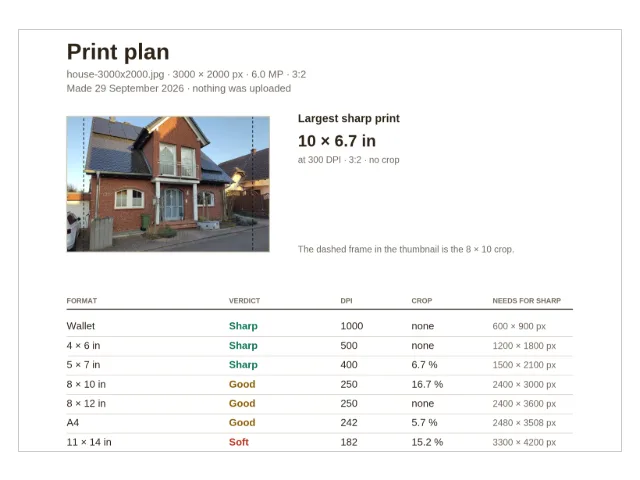
The checker above is the full tool from the print size page, running on this page. Drop a photo in and it reads that photo’s own pixels, names a verdict for every common print size from wallet to poster, and shows how much of the picture each size’s shape crops away. Everything happens in your browser — nothing is uploaded, and closing the tab erases it all.
How big can I print my photo?
Take a 3000 × 2000 pixel photo — 6 megapixels, an older camera’s size and still a common one. Its longest sharp print is 3000 ÷ 300 = 10 inches at the photo’s own 3 : 2 shape: 10 × 6.7 inches, no crop. The same photo against the sizes labs actually sell (computed with the checker’s arithmetic, 29 September 2026):
| Print size | Verdict | Effective DPI | Crop |
|---|---|---|---|
| 4 × 6 | Sharp | 500 | none — same shape |
| 5 × 7 | Sharp | 400 | 6.7 % |
| 8 × 10 | Good | 250 | 16.7 % |
| 8 × 12 | Good | 250 | none — same shape |
| 11 × 14 | Soft | 182 | 15.2 % |
| 16 × 20 | Soft | 125 | 16.7 % |
Every row is one division: the pixels that land on each inch of paper after the crop that size’s shape needs. A 6-megapixel photo is already sharp at the sizes most homes actually use, and it stops being sharp exactly where the table says — not where a shop’s “recommended” badge says.
What does DPI mean — and how much do I need?
DPI counts the pixels that land on each inch of paper. More pixels per inch means finer detail, and the bands are settled practice, not taste:
| Verdict | Effective DPI | What it means |
|---|---|---|
| Sharp | 300 and up | Crisp even held close |
| Good | 200 – 299 | Looks good on the wall and in an album |
| Soft | below 200 | Visibly blurry at reading distance |
Distance is the honest footnote. A print you hold needs the full 300; a print on a wall is seen from further back, and the eye cannot resolve fine detail from a metre away. That is why the big print in the table above is more forgiving than it looks: the photo labs’ own standards (CEWE, Shutterfly and Mpix, read September 2026) work from about 150 DPI for posters viewed at that distance. Big prints are more forgiving than small ones — the opposite of what most people expect.
How many pixels does each print size need?
For a sharp 300-DPI print, each size needs its inches multiplied by 300 in pixels (computed from the sizes themselves, 29 September 2026):
| Print size | Shape | Pixels for sharp |
|---|---|---|
| Wallet (2 × 3) | 3 : 2 | 600 × 900 |
| 4 × 6 | 3 : 2 | 1200 × 1800 |
| 5 × 7 | 7 : 5 | 1500 × 2100 |
| 8 × 10 | 5 : 4 | 2400 × 3000 |
| 8 × 12 | 3 : 2 | 2400 × 3600 |
| A4 (8.3 × 11.7) | √2 | 2480 × 3508 |
| 11 × 14 | 14 : 11 | 3300 × 4200 |
| 16 × 20 | 5 : 4 | 4800 × 6000 |
| Poster (20 × 30) | 3 : 2 | 6000 × 9000 |
The shape column is the quiet part of the table. A 3 : 2 camera photo fills 4 × 6, 8 × 12 and 20 × 30 edge to edge; every other shape trims something. Read the two tables together and the whole subject is covered: the shape decides what gets cropped, the pixels decide how sharp the result is.
How big can I print an iPhone photo?
Bigger than most people expect. The 12-megapixel camera many iPhones have carried for years saves 4032 × 3024 pixels, and those pixels are sharp at every size a drugstore photo counter offers:
| Print size | Verdict | Effective DPI |
|---|---|---|
| 4 × 6 | Sharp | 672 |
| 8 × 10 | Sharp | 378 |
| A4 | Sharp | 345 |
| 11 × 14 | Good | 275 |
| 16 × 20 | Soft | 189 |
(Computed with the checker’s arithmetic, 29 September 2026.) Two honest footnotes. Phone photos are 4 : 3, not 3 : 2 — so the sizes that fit a camera photo perfectly (4 × 6, 8 × 12, 20 × 30) crop 11.1 % off a phone photo, and the squarer sizes barely crop it at all. And the 48-megapixel mode on newer phones doubles both sides, to 8064 × 6048 pixels: sharp through 16 × 20 at 378 DPI, still good on a 20 × 30 poster at 269 DPI, largest sharp print 26.5 × 19.9 inches.
Why does an 8 × 10 crop my photo?
The 8 × 10 frame is the shape trap of photo printing. It is 5 : 4 — nearly square — while a camera photo is 3 : 2, clearly oblong. To fill the squarer paper, the lab keeps the middle of the photo and trims the sides. On a 3000 × 2000 photo the arithmetic is exact: the crop is 2500 × 2000 pixels, so 500 of 3000 columns go — 16.7 % of the picture. Printed at the same scale, the full photo would be 12 inches wide; the 8 × 10 keeps 10 of those inches.
What to do about it: print 8 × 12 instead, which is 3 : 2 like the photo and keeps every pixel — 8 × 12 frames exist. Or make the crop yourself, where you can see it and choose the part worth keeping. The checker’s preview draws the dashed 8 × 10 frame directly on your photo, so the decision happens with your eyes, not at the lab.
What if the photo is too small for the size I want?
Nothing adds pixels — that is the honest limit of this checker and of every tool like it. Printing bigger than the pixels allow makes the result softer, not “more artistic”. If every verdict says Soft, the file is usually a small copy from a messenger or a website, and the fix is going back to the original on the phone or camera and checking that. And when the original is a frame of film — an old negative nobody ever printed — the free route back to its pixels is walked in What do you do with a box of old photo negatives?. The one exception is the poster rule above: a wall print viewed from a metre away still looks good from about 150 DPI, so a Soft verdict on a big print can be perfectly fine in the room it will hang in.
What do I do once I’ve picked a size?
Mostly, nothing: send the original pixels, because extra pixels never hurt and resizing never adds sharpness. When an exact pixel copy helps — a lab that asks for one, an upload limit, an email — make it with the image resizer; the A4 at 300 DPI size is one click, and the copy is made in your browser, nothing uploaded. Apple photos in HEIC format convert first on the HEIC to JPG page. The rest of the photo bench — checking what a photo reveals before you share it, calendars, album PDFs — sits on the image tools shelf.
Questions
How big can I print an iPhone photo?
A 12-megapixel iPhone photo — 4032 × 3024 pixels, the size many models save — is sharp at every common size through A4, good at 11 × 14, and soft at 16 × 20 (computed, 29 September 2026). The 48-megapixel mode doubles both sides: sharp through 16 × 20, still good on a 20 × 30 poster.
What DPI do I need for an 8 × 10 print?
300 DPI for a print you look at closely, which means 2400 × 3000 pixels; from 200 DPI (1600 × 2000 pixels) it still looks good. The checker shows your photo's own effective DPI for the 8 × 10, after the crop.
Why does an 8 × 10 print crop my photo?
Because an 8 × 10 is squarer (5 : 4) than the 3 : 2 shape most cameras save. The lab keeps the middle and trims the sides — 16.7 % of a 3 : 2 photo. Printing 8 × 12 instead keeps every pixel, because 8 × 12 is 3 : 2 as well.
Does the DPI number stored in my photo's file matter?
No. It is a printing suggestion the camera wrote into the file, and it says nothing about how many pixels the photo has — only pixels count. The checker ignores the tag on purpose and measures the pixels.
Can I print bigger than the sharp size anyway?
Yes, if you stand further away: a poster viewed from about a metre still looks good from 150 DPI upwards (lab standards, read September 2026). What no tool can do is add pixels — a print bigger than the pixels allow turns soft, not artistic.
Do I need to resize my photo before sending it to be printed?
Usually no — a lab prints the pixels it receives, and extra pixels never hurt. If a service asks for an exact pixel size, the image resizer on this site makes that copy in your browser, without uploading the photo.