Key takeaways
-
A box of old color negatives can be seen and saved for $0: photograph a strip against a bright white light, then convert it in the browser — no scanner, no account, and nothing leaves the house.
-
The negative is the camera's original and every print made from it is a copy, so the strip is usually the better master to keep — and boxes often hold frames nobody ever printed.
-
A 12-megapixel phone photographing one 35 mm frame delivers about 2845 DPI worth of pixels — 4032 px across 36 mm, computed 1 October 2026 — more than most people ever scan.
-
This site's converter saves a long side of up to 2400 pixels, a sharp print about 20 cm wide at 300 DPI (2400 ÷ 300 = 8 in, computed) — the honest ceiling of the free path.
-
Nine of ten first-page results for this question are digitization services whose business is scanning (read 1 October 2026); none of their advice pages mentions the free browser path or names its per-frame price.
-
Throw a negative away only after its digital copy exists, has been checked and lives in a second place — the two services that publicly disagree (DiJiFi: toss them; EverPresent: keep them) both assume a good scan already happened.
On this page
- What is actually in a box of negatives?
- How do you see what is on old negatives — without a scanner?
- What does digitizing a box of negatives cost?
- How good can a phone photo of a negative be?
- Can you throw old negatives away after scanning?
- What about slides and black-and-white film?
- How should the negatives I keep be stored?
- What happens once the photos are out?
- Questions
A box of old photo negatives is not a project for a service counter, and it is not clutter either. It is the camera’s original film from decades of family life — and the fastest way to see what is on it costs nothing: hold a strip against a bright light, photograph it with the phone in your pocket, and let a converter in this page’s browser bring the picture out. What happens after that — repairing, printing, deciding what to keep — is a series of small jobs, each of them doable at a kitchen table.
This guide walks the whole path in that order, including the parts the scanning services that rank for this question leave out (their business is the opposite of the free path; more on that below).
What is actually in a box of negatives?
Strips of orange-brown film in sleeves or paper envelopes, most likely color negative film from about the 1960s onward. Each strip holds the camera’s original pictures. A print made from that strip is a copy — one generation away, with whatever contrast and cropping the lab machine chose that day. The negative holds more range than the print was able to carry.
Two things follow from that. First, the box is usually the better master: if a print exists, the negative can produce a better version of it. Second, boxes regularly hold frames that were never printed — the shots the family skipped at the lab because each print cost money. Nobody has seen those pictures in fifty years.
If some strips are dark gray or black-and-white, they are black-and-white negative film — same job, no orange mask. Mounted cardboard squares are slides, a different case (below).
How do you see what is on old negatives — without a scanner?
The free path, step by step:
- Make a bright, even white light. A window with thin clouds behind is ideal. At night, a tablet or a second phone showing a plain white page at full brightness works. The light must be even — a single bare bulb shows as a hot spot in the result.
- Photograph one frame, flat and square. Hold the phone parallel to the film, close enough that the frame fills the picture, and let the camera focus before shooting. No flash — it drowns the film and mirrors your reflection into the shot.
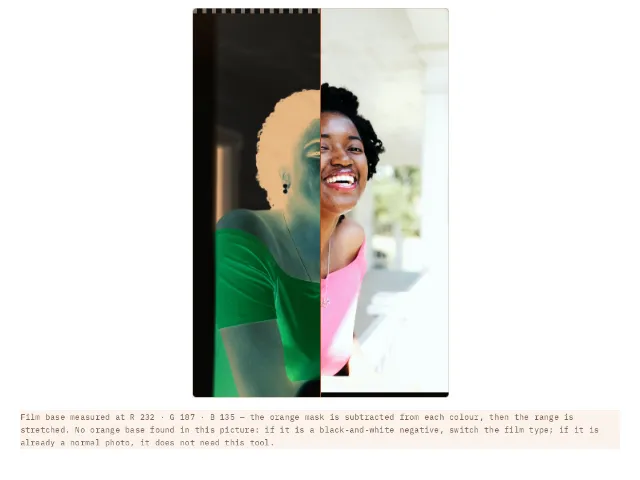
- Convert it in the browser. Bring the photo to the negative to positive converter. It measures the orange film base separately in red, green and blue, subtracts the mask, and stretches what is left into a real photo — the reason a plain inversion always comes out blue is that nobody subtracted the orange first. Everything happens on your device; the negative never leaves the house.
- One frame per photo works best. A whole strip converts as a strip; to save single pictures, crop each frame first with the image cropper, then convert.
Photographing through the back of the film mirrors the picture — the converter has a one-tick fix for that.
What does digitizing a box of negatives cost?
| Path | What it costs | Where the box ends up |
|---|---|---|
| A digitizing service | Paid per frame or per strip — none of the advice pages ranking for this question prints its per-frame prices (read 1 October 2026); you get a quote at order | Posted or carried to strangers, then returned |
| A flatbed scanner you own or can borrow | $0 extra — your time, one strip at a time at the scanner’s highest resolution | Stays in the house |
| A flatbed bought for this one box | A one-time purchase that outlives the box; no price quoted here, because scanner models and prices move — check a current list price before buying hardware for a single job | Stays in the house |
| Phone + white light + in-browser converter | $0 — the conversion is computed on your own device | Never leaves your hands |
The row none of the incumbents shows is the last one. It has an honest ceiling: the converter saves a long side of up to 2400 pixels, which prints sharp at about 20 cm wide at 300 DPI (2400 ÷ 300 = 8 inches, computed 1 October 2026). For an album, a frame on a shelf and most gifts, that is plenty — and it costs nothing to find out before spending anything.
How good can a phone photo of a negative be?
Better than most people expect, because the phone is not the bottleneck. A full 35 mm frame is 36 × 24 mm; a 12-megapixel phone puts 4032 pixels across those 36 mm — about 112 pixels per millimetre, or 2845 DPI worth of detail (computed 1 October 2026). A dedicated film scanner working at 2400 DPI produces 3402 × 2268 pixels from the same frame. The phone in your pocket, used squarely against good light, is already in that class.
What the free path cannot do:
- It does not repair the film. Dust, scratches and fungus on the negative are still visible after conversion. The old photo scratch remover fills that damage from the surrounding picture, and the faded photo color restorer brings back color that has drifted — both in the browser, nothing uploaded.
- It caps the size. 2400 pixels on the long side is a sharp 20 cm print, not a poster. The photo print size checker names the verdict for any file you actually have.
- It needs the film to lie reasonably flat. Curled or buckled strips photograph with patches of soft focus. A paid scan on a proper holder genuinely wins there, as it does for a box of many hundreds of frames where your time is the real cost, and for film that smells of vinegar or sticks to itself — that film needs a professional look, not a phone camera.
Can you throw old negatives away after scanning?
The two services that rank for this question publicly disagree, which is worth seeing side by side:
| Who says it | Their position | What it assumes |
|---|---|---|
| DiJiFi (a scanning service) | “You can throw away photo negatives” — five reasons not to feel guilty about tossing strips (read 1 October 2026) | That a good scan of every frame already exists — theirs |
| EverPresent (a scanning service) | Keep them: negatives are the originals, protect them before they degrade (read 1 October 2026) | That film, stored well, outlives any file format you might scan to today |
Both can be right, because they are answering different moments. The honest rule for a family box: a negative may leave the house only when its digital copy exists, has been opened and checked, and lives in a second place — a second drive, a cloud account, a copy with a sibling. Until then, the strip is the backup. And note the asymmetry the tossing advice skips: a negative in a cool, dry sleeve has already outlived every print made from it and will outlive a hard drive too. A folder of scans with no backup is the fragile archive, not the shoebox.
On the feeling that “nobody wants these”: family negatives have no secondhand market to speak of. Their value is to the people in them, which is exactly why the free path matters — you are not preparing an asset for sale, you are getting the pictures back.
What about slides and black-and-white film?
- Black-and-white negatives convert the same way, minus the orange mask: switch the converter’s film type to black-and-white and it works on brightness alone.
- Slides (film in cardboard mounts that already looks like a picture) are positives — photograph or scan them directly, no conversion. If they have faded, the color restorer measures and revives what is left.
- Undeveloped film — exposed but never processed — is the one case a browser cannot touch. A lab has to develop it first; do that before anything else, because latent images on old unprocessed film fade year by year.
How should the negatives I keep be stored?
Every page-one adviser, whatever else they sell, agrees on the storage basics (read 1 October 2026): strips flat in archival sleeves, in a cool, dry, dark place — not a damp basement, not a hot attic, and paper envelopes beat loose strips in a cigar box. Keep the scanned copies somewhere else entirely; the point of having both is that two bad days, not one, have to happen before a picture is gone.
What happens once the photos are out?
Conversion and repair are the middle of the job, not the end:
- Repair. Dust and scratches first, then faded color — the order does not matter. Both tools are on the restoring old photos page, which walks the whole bench including prints.
- Print. Check any file against the sizes labs sell with the photo print size checker; how much sharpness each size needs is answered in how big you can print a photo.
- Give. A restored family photo becomes a gift fast: a coloring page of grandma’s own wedding for the grandchildren, or several photos as one printable book — the Coloring Book Pack does that for €7, once.
And when someone asks where the pictures came from, the answer is the best part: they were in the box the whole time.
Questions
What can I do with old photo negatives?
Convert them to digital photos for free — photograph a strip against a bright white light and run the photo through the negative converter on this site, in your browser. Then repair dust and scratches, print or share the results, and decide which strips are worth keeping.
How do I convert old negatives to digital for free?
Photograph one frame flat-on against an evenly lit white surface (a window with thin clouds, or a tablet showing a plain white page), then drop the photo into the negative to positive converter. It measures the orange film mask and brings the picture out — no scanner, no upload, no account.
Can I really just photograph negatives with my phone?
Yes. A 12-megapixel phone filling the frame with one 35 mm negative delivers about 2845 DPI worth of pixels (4032 px across 36 mm, computed 1 October 2026). Hold the phone flat and steady, avoid flash, and let the camera focus before the shot.
Should I throw away negatives after scanning?
Only after the digital copy exists, has been opened and checked, and is stored in a second place. DiJiFi says tossing is fine and EverPresent says keep them (both read 1 October 2026) — the disagreement is really about whether the scan is good and safe yet.
Do old photo negatives have any value?
Family negatives have no secondhand market to speak of — their value is to the people in them. That is the honest reason to convert them, not to sell them.
What is the difference between negatives and slides?
A negative inverts light and color, so it needs conversion before it looks like a photo. A slide is already a positive picture — photograph or scan it directly, no converter needed.