On this page
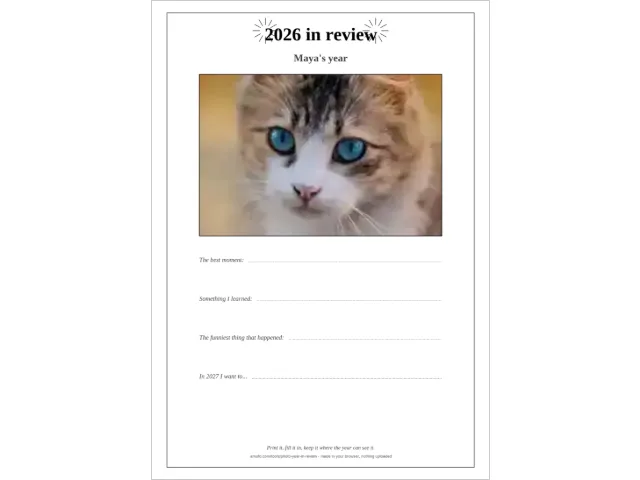
The card above is the whole job: one photo, one page, printed. What the screenshot-heavy tutorial pages do not tell you — because their templates are fixed images, not generated pages — is what actually lands on the paper: which photo survives the crop, where the year sits, how long the fill-in lines are, and what changes between A4 and US Letter. This page does, with the numbers computed from the generator itself.
What is a year in review card?
One printed page that carries a whole year: the year in large type at the top, one photo framed in the middle, and four lines underneath to fill in by hand — the best moment, something learned, the funniest thing that happened, and one wish for the new year. It goes on the fridge door, into a school folder, or onto the table on New Year’s Eve, one per person.
It is the paper version of the recaps the phone apps make in December — and the deliberate opposite of them. A scrolling recap is watched once and forgotten; a card on the fridge is walked past every day of the new year. The big photo services sell a version of it too: “year in review” cards that they print and mail (Minted, Snapfish, Walgreens — read 27 September 2026). Those are greeting cards with your photos on them. This one is a memory page you print yourself, with lines to write on.
How do you make the card?
The generator above runs the whole thing in your browser, and the steps are short:
- Add one photo — the picture that carries the year on its own: the holiday, the new dog, the whole family. It stays on your device; no request ever carries it anywhere.
- Type whose year it was — “Maya”, “The Fishers”, or nothing and it prints “My year”.
- Check the year — it is computed for you (see below); the selector moves one year either side.
- Pick the paper — A4 or US Letter, whatever your printer holds.
- Download and print at 100 percent — “actual size”, never “fit to page”, so the photo really is 150 × 100 mm and the lines really are where the layout says.
Then the part no tool can do: fill the four lines in, by hand, in the quiet hour between the meal and the fireworks — or on any evening of the first week of January, which works just as well.
Which photo fits the 150 × 100 mm frame?
The photo box is a landscape 3:2 rectangle, 150 × 100 mm, and the crop is a centred cover crop: the photo is scaled until the box is full, then whatever sticks out is cut — equally from both sides, top and bottom or left and right depending on the photo’s shape. What that means for the photo you pick, exactly:
| Your photo’s shape | What the crop keeps | What to do |
|---|---|---|
| 3:2 landscape (most cameras) | Everything — exact fit | print as is |
| 4:3 landscape (most phones, older cameras) | About 89% of the height; ~5.6% cut from top and bottom | fine unless heads are tight against the top edge |
| Square | The middle two-thirds of the height | centre the subject before uploading |
| Portrait (3:4, a phone photo upright) | Full width, but only the middle half of the height | crop to landscape first, or expect a big loss |
| 16:9 widescreen (a screenshot, a video frame) | About 84% of the width; ~7.8% cut from each side | fine for landscapes, risky for group shots |
(Visible fractions computed from the tool’s crop at 1200 × 800 px, 27 September 2026.)
The rule that falls out of the table: the subject wants to be in the middle. The crop never moves sideways to look for anyone — a person standing at the left edge of a widescreen shot is simply gone. If someone important stands at the side, crop the photo first (image resizer does it on the device).
One more honest number: the photo is prepared at 1200 × 800 pixels, which prints at about 203 DPI inside the 150 × 100 mm frame — plenty for a card. But that only helps if the source photo has the pixels to give. A thumbnail saved from a chat message goes soft at print size (the sample card in this page’s picture was made from a deliberately small photo, and the cat shows it). Send the original file to the printer, not a preview.
What exactly prints on the page?
Both paper sizes print the same design — frame, fireworks flanking the year, name line, photo box, four captioned lines, footer — and the photo box is identical on both: 150 × 100 mm. What shifts is everything around it, because Letter is shorter and wider than A4:
| Where | A4 (210 × 297 mm) | US Letter (215.9 × 279.4 mm) |
|---|---|---|
| Frame | 190 × 281 mm | 195.9 × 263.4 mm |
| Title baseline (“2026 in review”, 32 pt) | 25 mm | 21 mm |
| Name baseline (18 pt) | 38 mm | 36 mm |
| Photo box | 150 × 100 mm, top edge 46 mm | 150 × 100 mm, top edge 42 mm |
| The four lines | 162, 186, 210, 234 mm | 154, 176, 198, 220 mm |
| Footer | 278 and 283 mm | 258 and 263 mm |
(All positions computed from the generator’s PDF layout, 27 September 2026.)
The details worth knowing: the title “2026 in review” measures 69.2 mm across at its 32 pt size; the name line prints at 18 pt and even a 44-character name runs 132.1 mm, so it always fits inside the 190 mm frame (the input stops at 40 characters anyway). On A4 there are 16 mm between the bottom of the photo and the first line, and 55 mm of clear space under the last line — room for a signature or the date the card was made. On Letter the whole layout closes up by about 8 mm; if a pen rests on the last line, the wish for next year still has its full dotted run.
What do you write on the four lines?
The labels are printed; the answers are yours, by hand, after printing:
- The best moment: — the one story that gets retold all through next year.
- Something I learned: — a skill, a fact, or something about yourself.
- The funniest thing that happened: — the story that starts an argument at the table about when exactly it was.
- In 2027 I want to… — one wish, and the year is computed, so the line always names the right year.
The lines are built for handwriting on purpose: the writing lengths are 119.4, 114.2, 94.6 and 117.4 mm — about a short sentence each — measured from the card’s geometry, not estimated. The last label is the longest (“The funniest thing that happened:” takes 52.4 mm before the dotted run starts), which is why its line is the shortest: the layout balances the label against the writing space instead of pushing the line off the frame.
Children fill the same card in. The youngest draw on the lines and a grown-up captions beside the drawing — the same pairing the kids’ resolution sheet uses — and the resolutions-for-kids guide walks that evening in detail.
Card, book or calendar — which should you make?
The same camera roll feeds three different objects, and the difference is what the year’s photos are for:
| One-page card | Year-in-review book | 2027 photo calendar | |
|---|---|---|---|
| Photos | 1 | 12, one per month | 12, one per month |
| Pages | 1 | 12 | 12 monthly grids |
| Time to make | about a minute | an evening of choosing | an evening of choosing |
| Lives | fridge door, school folder, the table | passed around, leafed through | the wall, all year |
| Made with | the generator above | Images to PDF | Photo Calendar |
The honest advice: start with the card. Choosing the one photo that carries the year is the hard, good conversation — and if the choosing goes long, you have found your twelve monthly photos on the way. The card goes to the fridge; the book goes to the coffee table; the calendar puts the year’s photos on the wall for all of 2027. None of them needs the others to exist, but one camera roll makes all three. The book step — twelve photos into one PDF — is one of the jobs the PDF-without-Adobe guide covers, along with merging, splitting and what honestly still needs real software.
When should you make it — and which year prints?
The year on the card is computed when the button is pressed, never fixed in a template: from September through December the card reviews the year now ending (made in late 2026, it prints 2026 in review and the last line asks about 2027), and from January through August it reviews the year that just finished — so a card made in February 2027 still reviews 2026, honestly, a little late. The selector moves one year either side for planners and latecomers.
This is the quiet advantage over the bought versions: the template shops re-list their “2025 Year in Review” PDFs every January, and a card from last season’s Etsy search prints the wrong year forever (read 27 September 2026). A generator cannot go stale.
The classic window is the quiet patch between the New Year’s meal and midnight — New Year’s Eve is Thursday 31 December 2026 and the year begins Friday 1 January 2027 — but a card made on any December evening, or printed as a stack for the whole table, lands the same. Schools run the same page as a memory sheet in the last week of term.
Why not buy one instead?
Buy one, if what you want is cardstock in an envelope with a photo collage on the front: the photo services (Minted, Snapfish, Walgreens — read 27 September 2026) print year-in-review cards and mail them, and that is a real product. Know the trade: the bought card carries your photos but no writing lines — it is a greeting card, not a memory page; you pay per card; the designs are the shop’s, with your photos fitted in.
The printable card here is the other trade: your printer, your paper, no cost but ink — and four lines that get filled in by the people whose year it was, after printing. It also prints grayscale happily on a mono printer (the photo becomes a black-and-white photo, which suits older pictures well). What it does not do: it takes exactly one photo, it cannot reposition the crop (centre your subject, or crop first), and it has no glitter. The New Year printables page collects the rest of the evening’s paper — the guessing game these same photos play, the children’s resolution sheets, the countdown — all free, all printed at home.
Questions
How do I make a year in review with photos?
With one photo, the generator above makes the one-page card in about a minute: add the photo, type whose year it was, download the PDF and print at 100 percent. With twelve photos, one per month, the images-to-PDF tool makes a twelve-page year-in-review book instead.
What size does the photo print on the card?
Exactly 150 × 100 mm, centred, from a cover crop that fills the frame — that works out to about 203 DPI from the 1200 × 800 pixel image the tool prepares. Photos with the subject in the middle survive the crop best; if someone stands at the edge, crop the photo first.
Can I make a year in review card for free?
Yes — the generator above is free with no account, no watermark and nothing uploaded. The paid routes are Etsy and Canva templates you edit yourself and the photo services that print and mail cards (read 27 September 2026).
Does the card work on US Letter paper?
Yes — the photo box is the same 150 × 100 mm on both papers, and only the frame and the line positions shift: the four lines sit at 154, 176, 198 and 220 mm on Letter versus 162, 186, 210 and 234 mm on A4. Pick your paper in the tool before downloading.
Which year prints on the card?
The year is computed when you press the button: made in late 2026 the card reviews 2026 and its last line asks about 2027, and made in January 2027 it still reviews 2026. The selector moves one year either side for early planners and late makers.
Can children fill the card in themselves?
Yes — the lines are dotted for handwriting, and the labels ask the questions (the best moment, something learned, the funniest thing, next year's wish). Younger children draw on the lines or dictate while a grown-up captions, the same way the kids' resolution sheet works.