How does the photo booth work?
Press Start the booth and allow the camera. A countdown runs 3, 2, 1 before each shot, the screen flashes, and the photo lands in its place on the strip while the next countdown starts. Four shots take about fifteen seconds. Press Stop at any time; the photos already taken stay.
The strip you see while you pose is the strip you download: the frame, the look and the date stamp are drawn live onto the camera picture, so there is no separate editing step afterwards. Change the frame or the look after shooting and every photo on the strip changes with it.
What size is the strip, and what do the three files hold?
| File | Size | Pixels | What it is for |
|---|---|---|---|
| The strip | 2 × 6 in (5.08 × 15.24 cm) | 600 × 1800 | Keeping, sending, printing on its own |
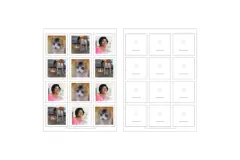
| 4×6 print | 4 × 6 in (10.16 × 15.24 cm) | 1200 × 1800 | One photo print with two strips to cut apart |
| Story | 9:16 | 1080 × 1920 | A story or a phone wallpaper |
All three are drawn at 300 dots per inch where they are meant for paper, so the strip prints sharp at its real size. The 4×6 print has small marks at the top and bottom of the middle line to show where to cut.
How do I print photo booth strips at home or at a photo counter?
- Choose the 4×6 print tab and download the JPG.
- Order it as a normal 4 × 6 inch print (10 × 15 cm in Europe) at a photo counter or kiosk, or print it on 4 × 6 photo paper at home with scaling set to 100 percent or “actual size”.
- Cut down the middle between the two marks. A paper trimmer gives the straightest line; scissors work.
Printing the single strip on A4 or Letter paper works too: set the scaling to 100 percent and it comes out 2 × 6 inches.
Which look should I pick?
- Color keeps the photo as it is, a touch brighter.
- Black and white is the look of the old chemical booths, with a little more contrast.
- Warm film lifts the shadows, warms the colors and adds grain, like a print from a disposable camera.
- 2000s digicam pushes the colors and the contrast, cools the shadows and adds a fine noise, like a pocket camera from 2005.
The orange date stamp works with every look. On a camera shot it shows the day you took it; on a photo you add it shows the date the file carries.
How do I get a good photo booth strip?
Face a window or a lamp rather than having the light behind you, and sit about an arm’s length from the camera so heads and shoulders fit the frame. Plan the four poses before you press Start (a classic set is: smile, silly face, surprise, a kiss or a hug), because the countdown does not wait. For a group, the 3-photo strip gives each photo a taller, almost square frame.
What does this photo booth not do?
It takes photos, not video or GIFs, and it does not add stickers. It needs a browser that may use the camera; if yours cannot, the page says so and you can add photos instead. The strip is a picture file, so it prints at the size of the paper you choose; it is not a physical booth print and has no adhesive back.
Questions
Is this online photo booth free?
Yes. Every frame, look and download is free, with no account, no watermark and no limit on how many strips you make.
Do my photos get uploaded?
No. The camera picture goes straight onto the strip in your browser, and photos you add are read on your device. Closing the tab erases everything.
What size is a photo booth strip?
The classic strip is 2 × 6 inches (5.08 × 15.24 cm). The strip you download is 600 × 1800 pixels, which is that size at 300 dots per inch, the resolution photo labs print at.
How do I print my photo strip?
Download the 4×6 print. It holds two copies of your strip side by side on one standard 4 × 6 inch (10 × 15 cm) photo print. Order it at any photo counter or print it on 4 × 6 photo paper at home at 100 percent, then cut down the middle: one strip for you, one for a friend.
Why does the camera not start?
The browser asks once whether this page may use the camera. If you said no, allow it with the camera icon in the address bar and press Start again. On a laptop without a camera, add photos from your phone instead.
Can I use photos I already took?
Yes. Add up to four photos from your phone or computer instead of using the camera. To swap one photo, tap it on the strip and pick another.
Are the photos mirrored?
Camera shots are saved the way you saw yourself on the screen, as in a mirror, which is how most people expect a selfie to look. Text on a sign behind you will read backwards. Photos you add are never flipped.