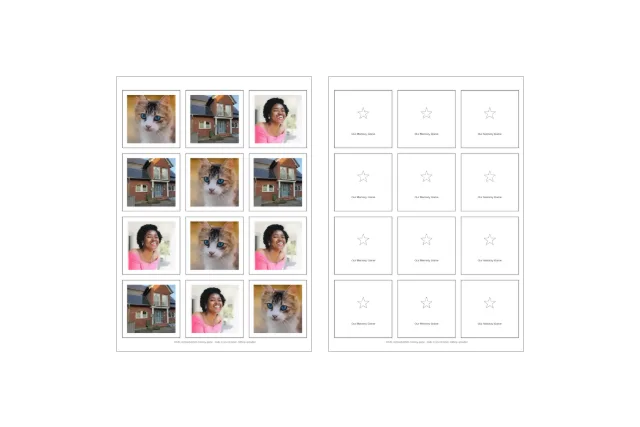
How does the photo memory game maker work?
Every photo you add becomes two identical cards — one pair. The tool shuffles all pairs into one long card sequence, lays them out 12 to a sheet, and draws a solid cut border around every card. With card backs on (the default), every front sheet is followed by its back sheet: the same grid, a star and your game title on every card, so the cards look uniform lying face down — and no player can recognise a photo from the back.
The shuffle is real: the two copies of a photo land in different places, and Shuffle again deals a fresh layout any time. What the preview shows is exactly what prints.
| Paper | Cards per sheet | Grid | Card size |
|---|---|---|---|
| A4 | 12 | 3 × 4 | 62 × 62 mm |
| US Letter | 12 | 3 × 4 | 62 × 62 mm |
The sheet math is computed from the layout above, September 2026 — the same numbers the tool shows while you add photos.
How many pairs make a good game?
| Who is playing | Photos (pairs) | Cards | Sheets |
|---|---|---|---|
| Ages 3–4 | 6 | 12 | 1 |
| Ages 5–6 | 8 | 16 | 2 |
| Ages 7 and up | 12 | 24 | 2 |
This is our suggestion, not a researched rule: start small, and add pairs when a game ends with the child still asking for another round. The Who is playing? selector above tracks your choice and tells you how far your photo count is from it.
How do I print it the right size?
- Download the PDF — it is built on your device, in your browser.
- In the print dialog, choose the paper you picked (A4 or Letter) and set scaling to 100 percent or actual size, never fit-to-page.
- With card backs on, print the whole PDF double-sided, flip on the long edge. The how-to sheet prints last, on its own page.
- Cut along the solid borders. A paper trimmer helps, scissors are fine.
The one mistake that spoils the game is fit-to-page: it shrinks every card a little, and cards cut at different sizes are easy to tell apart from the back.
Which photos work best?
The crop is a square from the centre: the middle of the photo stays, the sides go if the photo is wide. Faces looking at the camera, a pet, a favourite toy, a house — anything with the subject near the middle works. Group shots from the side can lose someone at the edge; if that happens, crop the photo first with any photo app and add the cropped version.
If the photos are old or precious, fix them first: the scratch remover and the color restorer run in your browser too, and the full sequence is on the restore old photos page.
Who is a photo memory game for?
The same people who order one from a photo print service: grandparents making a game from pictures of the grandchildren, parents turning a holiday or a school year into a rainy-day game, families at weddings and reunions where every guest is a card. Made here it costs paper and ink, exists in minutes, and nobody’s children are uploaded anywhere to get it.
More printables from the same camera roll: gift tags with your photo inside, an advent calendar from your own photos, and coloring pages from family photos — all on the photo gifts page.
The same bench has an evergreen door: the family and kids page, where the coloring pages, the thankful tree and the wish lists collect beside this game.
For the seasonal tables, the Thanksgiving page rows this game for the kids’ table — beside the coloring pages and the place cards — because one deck keeps the hour after dinner busy.
The full walk-through — which photos make strong pairs, how many pairs suit which age, and the print settings that decide whether the game works — is in the guide How to make a memory game with your own photos.
Questions
How do I make a memory game with my own photos?
Add 6 to 12 photos above and click the download button. Each photo is duplicated into a pair, all cards are shuffled, and you get a PDF of card sheets: 12 cards per page with cut lines, plus a back sheet for every front sheet. Print at 100 percent, cut along the borders, and play.
How many photos should a memory game have?
Our suggestion, not a rule: ages 3–4 are happy with 6 photos (6 pairs, 12 cards, one sheet), ages 5–6 with 8, and ages 7 and up can handle the full 12 photos (12 pairs, 24 cards, two sheets). Every child is different — the best game is one they finish.
How many cards fit on one sheet?
Twelve, on A4 and on US Letter alike: a 3 × 4 grid of 62 × 62 mm cards with 6 mm gaps, computed from the sheet layout. Six photos fill exactly one sheet; twelve photos fill exactly two.
How do I print the card backs on the reverse?
Print the whole PDF double-sided and flip on the long edge. The back sheets sit right behind their front sheets in the file, and the grid is centred and symmetric, so every back lands exactly behind its card. No duplex printer? Print the back sheets separately and glue, or use thicker paper and skip the backs.
What paper should I print a memory game on?
Thicker paper or light card works best — around 160 to 200 g/m² — so the photos do not show through from behind and the cards survive small hands. Plain printer paper works for a test round.
Are my photos uploaded anywhere?
No. The cards, the shuffle and the PDF are all computed in your browser, and no request carries a photo. That promise matters most on this page: a memory game is usually made from photos of children. Closing the tab erases everything.