How does the photo gift tag maker work?
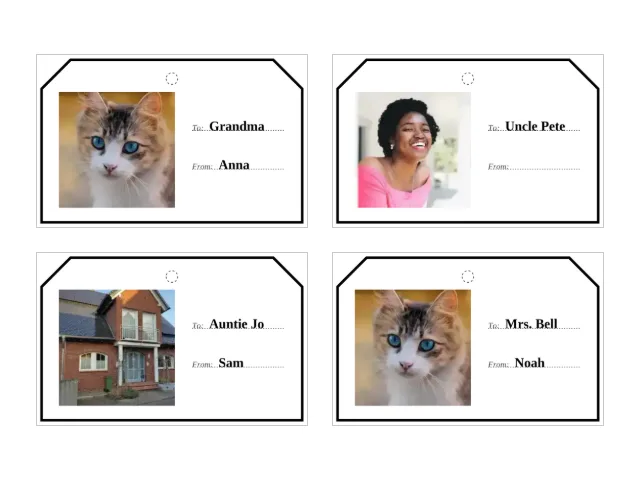
Each line you type becomes one tag: To | From, with the bar optional. Your photo is cropped into the left of the tag — square, from the centre — and the to and from lines sit beside it with dotted writing lines underneath. Eight tags print per sheet in a grid, each with a solid cut outline and a small dashed circle to punch for the string.
The tags are flat and finished, not templates. That is the point: printable gift tag sets are easy to find, but they are somebody else’s design with blank lines. Here the photo is yours and the names are typed before the ink hits the paper.
| Paper | Tags per sheet | Tag size | Photo on each tag |
|---|---|---|---|
| A4 | 8 | 90 × 56 mm | 40 × 40 mm |
| US Letter | 8 | 85 × 50 mm | 40 × 34 mm |
How do I print them the right size?
- Download the PDF — it is built on your device, in your browser.
- In the print dialog, choose the paper you picked (A4 or Letter) and set scaling to 100 percent or actual size.
- Cut along the solid outlines, punch the small dashed circle at the top of each tag, and thread ribbon or string through.
- Plain printer paper is fine; a slightly heavier sheet feels more like a real gift tag.
The one mistake that spoils the size is fit-to-page — it shrinks everything a little, and the tag no longer matches the photo’s proportions.
Which photos work best?
The crop is a centre crop: the middle of the photo stays, the sides go if the photo is wide. Faces looking at the camera, a pet, a house, a tree — anything with the subject near the middle works. Group shots from the side can lose someone at the edge; if that happens, crop the photo first with any photo app and add the cropped version.
If the photo is old or precious, fix it before it becomes a tag: the scratch remover and the color restorer run in your browser too.
Who are photo gift tags for?
Anyone wrapping presents who wants them to feel made, not bought: the family photo on every parcel under the tree, one child’s drawing-style portrait on the gifts to grandparents, the dog on the dog’s presents. For the 40-to-70 group it is the modern version of the tags that used to come off last year’s cards — with this year’s photo and no handwriting cramp on 24 December.
The same sheet works for other occasions, but this page is built for the Christmas rush — the Christmas photo gifts page collects the rest of the family’s presents: an advent calendar from your own photos, a coloring book for the grandkids, an old print with its color brought back. If your table needs seating as well as wrapping, the typed-and-folded Thanksgiving place cards are the same idea for the dinner table. And when the presents are for the grandchildren, the guide How to make a memory game with your own photos turns the same camera roll into the game they play after the unwrapping.
Do the tags print in black and white?
Yes. The outline and the typed names are black on white, so a mono printer loses nothing — the photo prints as a black-and-white photo, which suits vintage family pictures well. For a colour photo tag, any home colour printer is fine; photo paper makes the picture pop but is not required.
Is anything uploaded?
No. The photo crop, the tag layout and the PDF itself all happen in your browser. Nothing you add here — photos or names — is sent anywhere, and closing the tab erases it. More printables from the same camera roll, all working the same way, are on the Christmas page and in the images-to-PDF tool.
Questions
Can I put my own photo on printable Christmas gift tags?
Yes. Add your photo above, type the to and from lines, and download the PDF — your photo is cropped into every tag, next to the typed names. It is free, there is no account, no watermark, and the sheet is built on your device.
How many gift tags do I get per sheet?
Eight, printed at true size. On A4 each tag is 90 × 56 mm; on US Letter each tag is 85 × 50 mm. Print at 100 percent — not fit-to-page — and the sizes come out exact.
Can I use the same photo on all the tags?
Yes. The default spreads your photos across the tags in order and repeats the set; switch to one photo on every tag and the first photo prints on all of them. One family photo on fifteen tags is one sheet and a bit of cutting.
Do I have to write the names by hand?
No — the names are typed on the tag. But a side you leave empty is not lost: an empty to or from keeps its dotted line, so you can finish a tag by hand after printing if you want to.
How do I attach the tags to the presents?
Cut along the outline, punch or cut through the small dashed circle at the top, and thread ribbon, string or a twist tie through the hole. Tape works too if you would rather not punch.
Are my photos uploaded anywhere?
No. The crop, the layout and the PDF are all computed in your browser, and no request carries a photo or a name. Closing the tab erases everything.