On this page
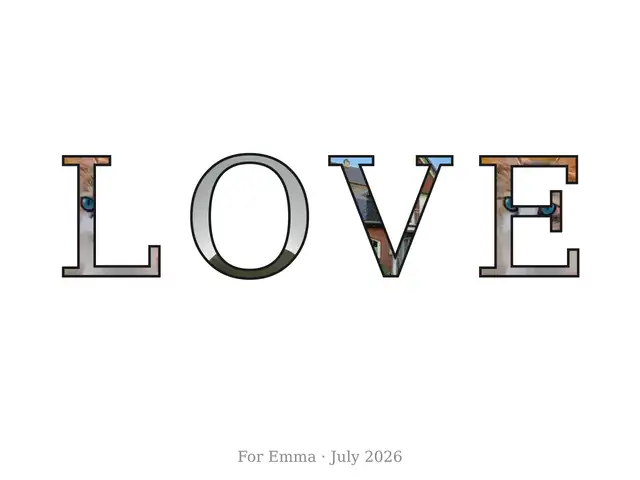
A letter photo collage is a name made of pictures: every letter of EMMA or LOVE or FAMILY becomes a little frame, your photos sit inside the letter shapes, and the whole word prints on one sheet at frame-ready size. The letter photo collage maker on this page does the layout job — the part every other method leaves to you — and prints true-size, free, with nothing uploaded.
How do you make a letter photo collage?
- Type the word or name. Up to 12 letters fit on the sheet; a space starts a new row, so AMELIA ROSE prints as two rows. A row longer than six letters splits into two rows by itself.
- Add your photos. Three are enough — the maker spreads them across the letters in order and reuses them when it runs out.
- Rearrange per letter. Click any letter to deal it a different photo, or press spread and shuffle until the mix looks right. The row under the preview shows which photo each letter got.
- Pick the look. Photo-filled is the default; ink outline draws a line around each letter so the shapes read clearly on busy pictures, and solid color prints bold plain letters. The backing stays white, cream or black.
- Download and print. The PDF prints at true size on US Letter or A4 paper; the PNG is for posting.
The preview redraws on every change, so the whole job is a minute or two from typing the name to holding the sheet.
How many photos do you need?
Fewer than you think. The maker reuses photos, so three fill any word — one picture can sit in several letters. Five to nine photos make every letter read differently, which is the look most people want on a nursery wall. Thirty is the cap. And if one photo is the whole point — a single face spelled across LOVE — click each letter until it shows that photo; you can pin the same picture in every cell. Because everything runs in your browser, photos of children never leave your device.
What size should the photos be?
Bigger than a thumbnail, smaller than you fear. The letter size depends on the word — computed from the maker’s layout, October 2026:
| Letters in a row | Tile on US Letter | Tile on A4 | Pixels per tile at 300 DPI |
|---|---|---|---|
| 3 (JOY) | about 59.3 mm | about 57.3 mm | about 700 px |
| 4 (EMMA, LOVE) | about 43.5 mm | about 42.0 mm | about 514 px |
| 5 | about 34.0 mm | about 32.8 mm | about 402 px |
| 6 or two rows | about 27.7 mm | about 26.7 mm | about 327 px |
The rule behind the last column: pixels = millimetres ÷ 25.4 × 300. A phone photo of 1000 pixels on the short side covers every preset without upscaling — enlarging adds pixels, not detail. The PNG export draws each sheet at 12 pixels per millimetre, so the file is already print-sharp when you post it.
Paper letters, Photoshop, Canva or a printable maker?
The tutorials that rank for this craft all end at “now do the fiddly part yourself” or “now pay”. Compared honestly (three read in full 17 October 2026; the paper-mâché craft blog known from its search snippet — its full read was blocked, the desktop-software site from a 16 October read):
| Way | What you need | Cost | The photos |
|---|---|---|---|
| Printable maker (here) | a browser | free | laid into the letters for you, true size, in minutes |
| Paper-mâché letters (itsalwaysautumn.com) | letters, printed photos, glue, an afternoon | craft supplies | printed, trimmed and glued on by hand |
| Photoshop clipping mask (littlegoldpixel.com, 2019) | a paid Photoshop license and mask know-how | paid software | one image inside one block of text, manual |
| Canva Font Frame app (tutorial.ai) | a Canva account; the app has free and premium tiers | free tier | dragged in inside Canva’s editor, screen-size output |
| Desktop software (figrcollage.com) | an installed program | free trial, paid license | exported from the app after layout by hand |
| Personalized print service (positiveprints.com) | uploading family photos to a shop | $29.95 | the shop prints and mails it — a week’s wait, photos on their servers |
If cutting and gluing is the fun part, the paper-mâché route is honest craft. If you already live in Photoshop, the mask takes two minutes. For everyone else — and for any name you want by tonight — the maker above is the one where the computer does the fitting and the photos stay on your device.
How do you print it at true size?
In the print dialog choose actual size, never fit to page — the poster is drawn for US Letter (8.5 × 11 in) or A4 with a 15 mm white margin, so a home printer prints every letter whole. Matte photo paper or heavy card makes the tiles read as one piece of art. A caption line under the name (“Emma · July 2026”) turns the sheet into a dated keepsake, and the PDF’s last page repeats these steps so they are never further away than the printout.
What this maker deliberately does not do
It does not build grid collages — many photos in rectangles on one sheet is the images to PDF job. It does not trace letters out of scenic photos alphabet-art style; your photos fill the shapes of your own word. And it never uploads: the collage is drawn by your browser, from your photos, on your device.
When the poster is framed, the same bench finishes the gift: gift tags with a photo inside for the wrapping, and the whole shelf of ideas on the photo gifts page.
Questions
How do I put pictures inside letters?
Type the word in the maker above and drop in your photos — every letter becomes a frame filled with your pictures, and clicking a letter deals it a different photo. Download the PDF to print or the PNG to post.
How many photos do I need for a letter collage?
Three are enough, because the maker reuses your photos across the letters — five to nine make every letter read differently. The cap is 30 photos for a 12-letter word.
What size should my photos be?
Any modern phone photo is plenty: even the biggest tile (about 5.9 cm) needs only around 700 pixels on its short side to print sharp at 300 DPI, computed October 2026. Photos of 1000 pixels and up cover every word length without enlarging.
Is the letter photo collage maker free?
Yes — no account, no watermark, no limit on how many you make. The only line it adds is a small made-at-amufo.com credit at the foot of the sheet.
How do I print the collage at true size?
Download the PDF and print at 100 percent (actual size), never fit to page — the poster is sized for US Letter or A4 with a 15 mm margin. The PDF's last page repeats the print steps.