On this page
The posters that survive a youth season are the ones with faces. A team name on a pitch diagram is a tactic sheet; the same pitch with every player’s photo at their position is the page that goes on the clubhouse notice board, gets shared in the team chat, and turns up again at the end-of-season dinner. This page is how to make one — with the maker embedded above, or with whatever tool you already have.
The maker does the whole job in the browser: pick the game format, pick a formation, type names and shirt numbers, add one photo per player, print. There is no account, and the photos are never uploaded. The sections below compare it honestly with the other routes — including the ones that rank first for this question — and answer the format, photo-count and printing questions that come with the job.
How do you make a lineup poster with player photos?
Three steps, about ten minutes at the kitchen table:
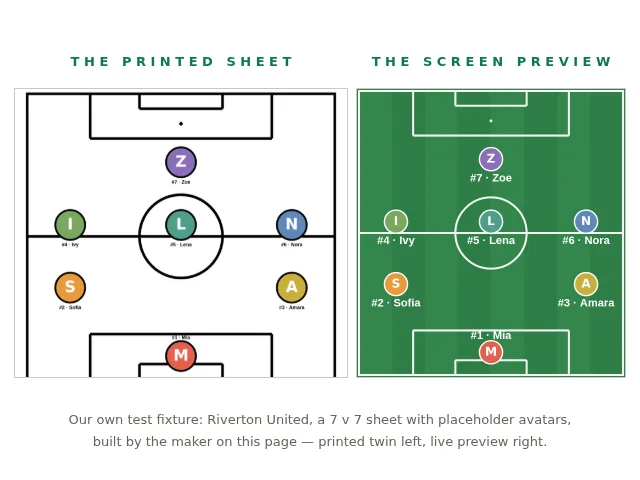
- Pick the setup — the game format and the formation (how the players are spread over the pitch). Match the game format to the age group (the ladder is below) — 5v5, 7v7, 9v9 or 11v11 — then pick the formation: 2-3-1 at 7v7, 4-4-2 at 11v11, and so on; the maker offers the common youth formations for each format. The sheet always carries exactly that many players, and the maker shows its arithmetic — “7 v 7 · 2-3-1 — 7 players: 1 goalkeeper, 2 defenders, 3 midfielders, 1 forward” — before you print.
- Type names and shirt numbers into the roster rows. Names, numbers and the formation are remembered in the browser for next week’s sheet.
- Add the photos and print. Tap the round button next to a player and pick one, or drop a handful of photos into the “Add team photos all at once” box, which fills the empty circles in squad order (the order of the rows on the sheet). Each photo can still be swapped or removed by tapping its circle. The Download button builds a true-size A4 PDF (on US Letter paper, print it “fit to page”); the Print button prints directly. The photos appear in each player’s circle on the pitch and again in “The team” list underneath, so the sheet names the faces twice.
Photos are optional: a sheet with names and numbers only is still a complete lineup sheet. The photos are deliberately not kept — they stay in the tab and are gone when it closes, because a phone gallery is personal and the sheet only needs them for the moment it prints.
Which method should you use to make the poster?
Four routes exist, and each trades something away. Every competing site in the table below was checked on 2 October 2026 — some opened in full, some judged from their listing in the search results:
| Method | Cost | Your own photos? | What it asks of you | What you get |
|---|---|---|---|---|
| Canva, Adobe Express, PosterMyWall (listing level, read 2 October 2026) | free tier | yes — you place them yourself | an account, and design skill — the tutorials that rank beside them run 5–15 minutes through shapes and layers | a digital export |
| Pro lineup builders: createformation.com and renderfoot.com (opened in full), FotMob, buildlineup, chosen11 and others (listing level) — all read 2 October 2026 | free | no — createformation draws on a database of about 19,000 professional player photos (squads updated September 2026); renderfoot takes names and numbers only, with no photo upload | a pick of real clubs, nations and formations | a PNG graphic |
| Etsy, Zazzle, Amazon (listing level, read 2 October 2026) | paid — priced per listing | yes — you send them | your photos, payment, and a wait for production and shipping | a printed poster, made for you |
| The maker on this page | free | yes — added in the browser, never uploaded | no account, no design skill | a printable A4 team sheet |
The pattern across the first search results: the design tools can do anything if you can design; the free lineup builders are genuinely free and genuinely good at professional-fantasy graphics, but their photos come from their databases, not your team; and every site found that takes your own photos is a paid personalization listing. Renderfoot, opened in full, is worth knowing precisely: 5v5–11v11, twelve formations, names, numbers and colours into a free 1080 × 1920 PNG, no sign-up (video export needs an account) — the right tool for a names-only starting-11 graphic, and honest about not being the photo tool. The gap this page fills is the youth job: your players’ own faces, on a formation, printable, free.
Which game format and formation should the poster show?
The poster has to match the game the team actually plays, or the player count is wrong before anything else:
| Age group | Game format | Players on the poster |
|---|---|---|
| Under 7 / Under 8 | 5 v 5 | 5 |
| Under 9 / Under 10 | 7 v 7 | 7 |
| Under 11 / Under 12 | 9 v 9 | 9 |
| Under 13 and older | 11 v 11 | 11 |
This ladder is re-cited from the game-day guide’s dataset, compiled 24–25 September 2026 from The FA, US Youth Soccer, DFB and IFAB rulebooks — the full table there adds pitch sizes, ball sizes, match lengths and the federations’ disagreements (England’s 2026-27 FutureFit pathway moves each format up a year, for one). When your league’s handbook says something else, the handbook wins.
How many photos do you need for a lineup poster?
One per player on the sheet — five at 5v5, seven at 7v7, nine at 9v9, eleven at 11v11. There is no substitutes row: the sheet prints the players on the pitch.
Any phone photo works, because the maker crops each one to a circle from its centre. But the printed circles are small — 18 mm across on the pitch and 16 mm in the team list, computed from the maker’s own print geometry — so a photo where the face fills the frame reads clearly, while a full-body shot crops to a torso. The reliable source is the team chat itself: one message asking for a face-on photo of each player, which parents answer faster for this than for almost anything else.
What should the poster be for each occasion?
The same sheet serves the season’s four poster moments; only the header and the print count change:
| Occasion | What to fill in | Output |
|---|---|---|
| Game-day notice board | team, opponent, date, kick-off — the starting lineup | one printed A4, black on white, pinned up |
| Team-chat graphic | the same sheet | the A4 PDF shared as a file — phones open PDFs; for a phone-shaped PNG with names only, a free builder does that (read 2 October 2026) |
| Senior night | the whole team sheet, with the date line naming the occasion (“Senior Night · Friday 15 May”) | one printed A4 for the entrance table |
| End-of-season banquet | the whole squad’s photos, date line as the banquet date | one printed A4 per team — for the fuller printed set (player cards, certificates), the Soccer Season Pack is €7 once, and this sheet stays free |
What can this lineup maker not do?
Being honest about the edges is what makes a tool trustworthy:
- It has no professional database. It cannot build the televised-fixture graphic with real club squads and player faces — createformation and renderfoot do that, free, and are the better tools for it.
- Its output is the A4 team sheet — print or PDF — not a phone-shaped story graphic, and not a designed poster with backgrounds, frames and text art.
- It prints one game at a time, in soccer’s youth formats only (5v5 to 11v11).
- It keeps no photos between visits. Names, numbers and the formation are remembered; photos are not, because photos that are never stored can never be uploaded.
The rest of the season’s paper is on the same bench: the match-day poster maker prints the fixture itself — kick-off, venue, colours, no photos — the game-day guide walks the whole match-morning folder from formats to ball sizes, and the practice guide covers the evenings between matches. All of it is collected on the sports hub, free, no account, nothing uploaded.
Incumbent behaviour was read on 2 October 2026 and disclosed at read level: createformation.com and renderfoot.com were opened in full; Canva, Adobe Express, PosterMyWall, FotMob, buildlineup, chosen11, Etsy, Zazzle and Amazon were read at listing level. The reads live in reports/serp/2026-10-02-lineup-poster-guide.md. The format ladder is re-cited from the game-day guide’s dataset (compiled 24–25 September 2026 from governing-body documents). The photo-circle sizes — 18 mm on the pitch, 16 mm in the team list — are computed from this page’s maker, not estimated; the only claim made on its behalf is the one it keeps: the sheet is drawn in your browser and nothing is uploaded.
Questions
How do I put player pictures on a soccer lineup?
Tap the round button next to a player and pick a photo, or drop several into the 'Add team photos all at once' box — they fill the empty circles in squad order, and each can be swapped or removed by tapping its circle. The photos are cropped to circles automatically, right in the browser.
What's a free app for lineup posters?
You don't need an app: the maker on this page runs in the phone's browser, free, with no account and nothing uploaded. The free lineup sites that come up first in the search results are aimed at professional-fantasy graphics — they take names and numbers, or pull player photos from a database, not your own pictures (read 2 October 2026).
How many photos do I need for a lineup poster?
One per player on the sheet — five at 5v5, seven at 7v7, nine at 9v9, eleven at 11v11. Photos are optional: names and numbers alone still print a complete sheet.
Can I print the lineup sheet for the notice board?
Yes — one A4 page, black on white, so it prints on any printer and survives the photocopier. Print at 'actual size' where the printer offers it; on US Letter paper, use 'fit to page'.
How do I make a starting 11 graphic for the team chat?
Print this page's sheet to a PDF and share the file — phones open PDFs, and the photo sheet works in the chat as well as on paper. For a phone-shaped 1080 × 1920 PNG with names and numbers only, renderfoot.com builds one free without a sign-up (read 2 October 2026).