On this page
The graduation photo banner is the party’s timeline wall: thirteen school pictures in a row, kindergarten to senior year, above the cake table. The store versions sell it three ways — a physical banner with pre-cut slots that ships to you, a paid template file you edit in an online design account, or a print-and-glue template where you write the grade labels by hand. All three stop at the same place: they hand you the start of the job.
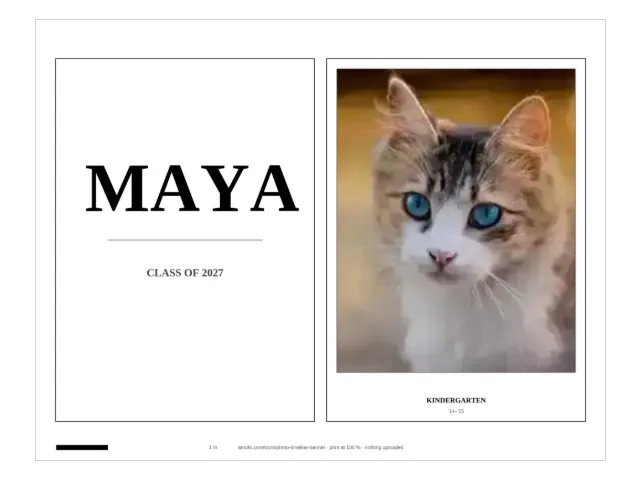
The maker on this page finishes it. Add one school photo per grade and it lays out a printable banner — the title card with the name and class year, then one labeled card per grade, each cut to a real photo-print size — and computes the sheet count and the ribbon length for your exact run. Everything happens in your browser; the photos never leave your device. Other photo decorations for the same party live on the photo gifts page, and the rest of this page is the walk-through: photos, sizes, printing, hanging.
How does a graduation photo banner go together?
Three steps, and the maker does the first one’s arithmetic:
- Print the sheets — the title card, one photo card per grade with its label (KINDERGARTEN, 1ST GRADE … 12TH GRADE) and, if you leave them on, the school years computed from the class year: the class of 2027 was kindergarten in ‘14–‘15.
- Cut along the solid outlines. Scissors are fine; a trimmer is faster on a 14-card run.
- Hang the cards on a ribbon in grade order — tape, mini clothespins, or clips, about 3 cm between cards, with 15 cm of spare ribbon at each end to tie to a hook.
The last sheet of every download is the plan: how many cards, how many sheets, how much ribbon, and the steps in order — so the party helper who does the cutting has the same numbers you do.
Which photo goes with which grade?
One photo per grade, in the order the grades happened. The crop fills each card’s window from the middle of the picture, so a face near the centre works best — the classic school-portrait framing. Three habits make the finished line look like one set even when the photos are not:
- Mixed cameras and decades print well in black and white. A 2014 phone photo and a 2026 school portrait sit together more quietly in greyscale — the same trick the craft tutorials use for mixed-year photo walls.
- A grade without a photo still prints. It comes out as a labeled empty frame with a “glue photo here” hint — find the print later and stick it in. Most families finish the banner exactly this way.
- The range is adjustable. Only the early years survive in the album? A K–5 banner takes six photos. The high-school run alone? Set 9–12. The maker recomputes sheets and ribbon for whatever range you pick.
One honest limit: the maker holds 13 photos, one per grade, and does not sort or edit them — the photo lands on the grade slot you give it. If a scan is crooked or faded, fix it first; the photo print size checker tells you whether the file is even sharp enough for the card size you want before you print.
What size should the cards be: 8 × 10, 5 × 7 or half-letter?
The “k 12 8x10” in the search bar is the store size: 8 × 10 in cards, one per sheet. The maker prints all three photo sizes and computes the difference for the full kindergarten-to-12th run — 13 grade cards plus the title card (October 2026, from the tool’s layout):
| Card size | Cards per sheet | Sheets to print | Ribbon to cut |
|---|---|---|---|
| 8 × 10 in | 1 | 14 | about 3.5 m |
| 5 × 7 in | 2 | 7 | about 2.5 m |
| Half-letter | 1 | 14 | about 2.6 m |
The trade is sheets against presence: 8 × 10 is the size people expect from the store banners, and it eats 14 sheets; 5 × 7 is half the paper and, hung at 3 cm gaps, reads as the same line on the wall. The ribbon rule behind the table — each card’s own width, plus 3 cm between cards, plus 15 cm at each end — is computed and printed on the plan sheet for your card count, so a shorter range simply re-runs it.
How do I print the cards the right size?
Print at 100 percent / actual size — never “fit to page.” Fit-to-page is the one setting that quietly ruins a size-promised print: every card shrinks a little, and the 8 × 10 card stops being 8 × 10. The maker bakes a check onto every page so the mistake cannot reach the scissors:
- In the print dialog, pick the paper you chose (US Letter or A4) and set scaling to 100 percent or actual size.
- Measure the black bar at the bottom of the page: it must be exactly 1 inch — 2.54 cm.
- Short bar? The printer scaled the page. Reprint at actual size.
- Then cut and hang.
How do I hang it?
The ribbon math already assumes your hanging plan: 3 cm between cards, 15 cm of spare at each end. Two Command hooks — one at each end, above the cake table or along the entryway wall — take the 5 × 7 run without complaint; the spare ends tie on cleanly. Tape and mini clothespins work too; clothespins have the party-day advantage that a card can be swapped when the “real” kindergarten print turns up mid-party. Along a mantel, skip the hooks and let the cards lie in a line on the shelf edge.
The flat cousin of this banner is photo bunting — photos and letter flags spelling a name, four flags to a sheet. It is the right tool when the message matters more than the timeline (“CONGRATS NOAH”); its guide walks the flag math. The timeline banner is the right tool when the thirteen years are the message.
And below the wall, the table prints its own set from the same visit: the graduation advice cards maker turns your guest count into a personalized guest-card run — the graduate’s name and class year typed onto every card, sentence starters to finish, the sheet count computed — with the “Advice for the Graduate” table sign and the advice-jar label in the same PDF.
The ceremony itself prints from the same browser: the kindergarten graduation diploma maker draws each child’s name, the teacher and the date into a true-size landscape diploma — photo optional, pasted class list for the whole class in one PDF.
What does the store-bought version do better?
Nothing that survives contact with party week — but the comparison is worth naming honestly (store pages checked October 2026). The physical K-12 banners on the big marketplaces are the real thing: you pay, wait for shipping, then still print your own photos to slot in. The Etsy-style template files are a one-time buy that needs an online design account and your photos uploaded to it. The free print-and-glue templates are the closest cousin: you print their sheet and write the grade labels by hand, year by year. What none of them do is compute your run — the sheets, the sizes, the ribbon, the true-size check — from your actual photos, in one visit, without an account or an upload. That is the whole difference, and it is the only claim this page makes.
What can the maker not do?
It is a print tool, not a design studio: one serif style, one card per grade, no themes, no clip art, and a 13-photo cap. It does not print and ship anything — the printer in your house is the print shop. And it cannot invent the missing years; an empty frame is the honest version of a year nobody photographed. For parties beyond graduation — a 1st birthday with one photo a month, an anniversary “then and now” line — the same camera roll works on the photo gifts page, where every tool runs under the same rules: free, no account, nothing uploaded.
Within graduation itself, the whole family shares one shelf: the graduation page collects this banner, the advice cards, the class diplomas, the senior yearbook ad and the senior-ad guide.
Questions
How do I make a graduation photo banner with my own pictures?
Type the graduate's name, pick the grade range (kindergarten to 12th is the classic 13-photo banner), add one school photo per grade, and download the file. You get a title card plus one labeled card per grade — print at 100 percent, cut along the outlines, and tape the cards to a ribbon in grade order.
What size should the photos be on a K-12 banner?
The two sizes the stores use both work: 8 × 10 in cards, the size of the store-bought banners, and 5 × 7 in cards, which print two to a sheet. The maker computes the sheet count and the ribbon length for your exact range, and every page carries a 1-inch bar so the cards come out true to size.
How many pictures do I need for a graduation photo banner?
Thirteen for the full kindergarten-to-12th run, one per grade — but fewer works too. A K–5 banner takes six, a 9–12 high-school banner takes four, and any missing year prints as a labeled empty frame you can glue the print into later.
How do I print the banner the right size?
In the print dialog set scaling to 100 percent or actual size, never fit to page, then check the black bar at the bottom of every page: it must measure exactly 1 inch or 2.54 cm. If it comes out short, the printer scaled the page.
How much ribbon do I need to hang it?
Each card takes its own width on the ribbon, leave 3 cm between cards and 15 cm at each end to tie. The full K-12 run needs about 2.5 m of ribbon in 5 × 7 or about 3.5 m in 8 × 10; the plan sheet in the download prints the exact figure for your banner.
Are my photos uploaded anywhere?
No. The cropping, the layout and the file you download are all computed in your browser, and no request carries a photo or a name. Closing the tab erases everything.