On this page
- What are photo gift tags?
- How do you make gift tags with your own photos?
- How many gift tags fit on one sheet?
- What size is each tag — and the photo on it?
- Which photos work best on a gift tag?
- Do you need a special printer?
- How much do photo gift tags cost?
- Can you use photo gift tags beyond Christmas?
- Questions
A gift tag does two jobs: it says whose present this is, and it makes the pile under the tree look cared for. A photo does the second job better than any printed reindeer — which is why “photo gift tags” is a real, searched thing. But the results for it split into three camps: pharmacy photo counters that print them for you, Etsy sellers that ship printed sets, and craft blogs that assume you own a cutting machine. The plain route — your photo, your printer, this evening — is oddly under-served.
This guide walks that route with the numbers that matter: how big the tags are, how many fit on a sheet, what they cost. Every figure below comes from the free photo gift tag generator at the top of this page — read from its print layout and verified against its running output on 26 September 2026, not estimated.
What are photo gift tags?
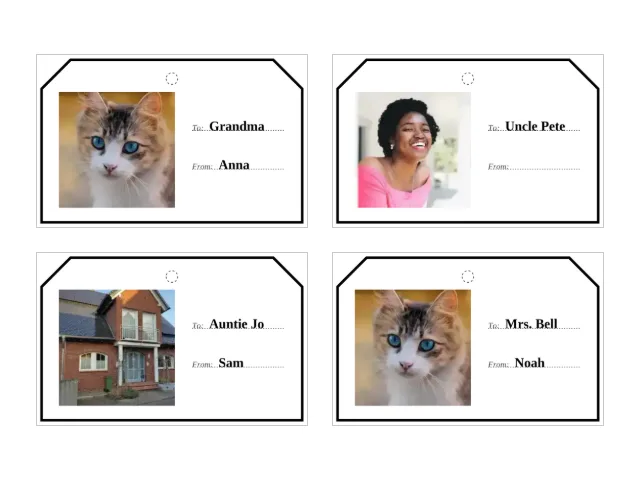
Tags with your own photograph printed inside them, next to a typed “To” and “From” — finished tags, not blanks. You cut them out, punch a hole, and tie them on like any gift tag. The photo is the decoration: the dog on the dog’s presents, the grandchildren on the grandparents’, last year’s beach hut on the neighbours’.
They differ from the “printable gift tags” that dominate search results in one decisive way: those are somebody else’s designs with blank lines to fill in by hand. Here the sheet arrives finished — photo cropped in, names typed — and the only work left is cutting.
How do you make gift tags with your own photos?
- Pick the photo (or photos). One clear subject near the middle works best, because the crop is a centre crop — the middle of the photo stays, the sides go if the photo is wide. Up to 12 photos can go into one tag set.
- Type the names, one line per tag. The format is
To | From— “Grandma | Anna”, “Uncle Pete”, or just one side. Each line becomes one finished tag; an empty side keeps its dotted line so it can be finished by hand after printing. - Choose how photos spread. The default walks your photos across the tags in order and repeats the set; one switch puts the first photo on every tag instead — the family-photo-on-every-parcel look.
- Download the PDF and print at 100 percent. Pick A4 or US Letter in the tool, then in the print dialog set scaling to “actual size”. This is the one setting that matters; fit-to-page shrinks every tag slightly and the sizes below stop being true.
- Cut, punch, tie. Scissors along the solid outline, a hole punch (or the tip of the scissors) through the small dashed circle at the top, then ribbon, string or a twist tie.
The generator runs entirely in the browser — the crop, the layout and the PDF are computed on your device, and no photo or name is sent anywhere.
How many gift tags fit on one sheet?
Eight, in a 2 × 4 grid, at true size on both paper sizes. The sheet count is one sum — tags ÷ 8, rounded up:
| Tags | Sheets |
|---|---|
| 8 | 1 |
| 16 | 2 |
| 24 | 3 |
| 40 | 5 |
| 48 (the maximum) | 6 |
(Computed from the generator’s sheet assembly, 26 September 2026.)
For scale: a family Christmas of 24 presents is three sheets — one printing session and a quiet half hour of cutting. The 48-tag ceiling is deliberate; past that, the tool says, you are running a mail room, not a Christmas.
What size is each tag — and the photo on it?
The generator prints two geometries, one per paper size. These are the layout’s own millimetres:
| A4 sheet | US Letter sheet | |
|---|---|---|
| Tag size | 90 × 56 mm | 85 × 50 mm |
| Photo inside | 40 × 40 mm | 40 × 34 mm |
| Tags per sheet | 8 | 8 |
| Sheet margins | 10 mm sides, 24.5 mm top and bottom | 17.95 mm sides, 27.7 mm top and bottom |
(Read from the generator’s PDF geometry, 26 September 2026.)
Three details worth knowing. Each corner is cut at 45° over 10 mm — the classic tag shape, and the line your scissors follow. The punch circle for the string is 4 mm across, centred 6.5 mm from the top, sized for standard ribbon and baker’s twine. And names up to 30 characters per side fit by stepping the type size down — “Grandma and Grandpa” prints comfortably on one line.
A 90 × 56 mm tag sits nicely in the hand and on a medium present; for small gifts and favour bags the Letter sheet’s 85 × 50 mm tags are the slightly daintier choice.
Which photos work best on a gift tag?
Faces looking at the camera, a pet, one house, one tree — anything with the subject near the middle. The crop is square (40 × 40 mm on A4), taken from the centre of the photo, so group shots lined up across the frame can lose the person at the edge. If that happens, crop the photo first in any phone photo app and add the cropped version.
Old photographs make some of the best tags — a black-and-white wedding photo on the golden-wedding presents — but mend them before printing: the faded photo color restorer measures how far the colours have drifted and slides them back, and the scratch remover fills creases from the surrounding picture. Both run in the browser, like the tag maker.
Do you need a special printer?
No. The outlines and names are black on white, so a mono printer loses nothing — and a black-and-white photo tag suits vintage pictures well. On a colour printer, plain paper is fine; a slightly heavier sheet (around 160–200 g/m²) feels more like a bought tag, and photo paper makes the picture pop at the cost of being harder to write on the back of. The one rule that stands: print at 100 percent, “actual size”, never fit-to-page.
How much do photo gift tags cost?
Made at home: paper and ink. For comparison, checked 26 September 2026 — on Etsy, printed custom tag sets sell at $3.51–4; at Michaels, personalised tag sets run $18.99–22; pharmacy photo counters (Walgreens, CVS, Walmart in the US) print photo gift tags as a photo product at counter prices. The home route also wins on timing: a re-print because one name changed costs one sheet, not a new order.
Can you use photo gift tags beyond Christmas?
Yes — the sheet itself carries no Christmas imagery: your photo, typed names, a cut outline. The same sheets do birthdays, teacher gifts at the end of the school year, and classmate presents. The making gets faster with practice; the photo choice never does.
If Christmas morning is the deadline, the neighbours on this site cover the rest of the pile: the photo advent calendar turns 24 photos into the December countdown, and the Thanksgiving place cards print the same typed-and-cut way for the dinner table — same pipeline, different job.
Every tag size, sheet count and margin above is read from the photo gift tag generator’s own print layout and verified against its output on 26 September 2026. Prices are from the gift-tags SERP read of the same date (Etsy, Michaels listing checks).
Questions
Can I make gift tags with my own photo at home?
Yes — the free photo gift tag generator runs in your browser: drop in a photo, type the to and from lines, download the PDF and print it at 100 percent, with nothing uploaded and no account.
Do I need a Cricut or a cutting machine to make photo gift tags?
No — the sheets print a solid cut outline around every tag, so plain scissors follow the line. Cutting machines appear all over the search results for this question, but they are one route, not a requirement.
How many gift tags do I get from one sheet?
Eight, printed at true size in a 2 × 4 grid — on A4 each tag is 90 × 56 mm, on US Letter 85 × 50 mm. Up to 48 tags print in one go, which is six sheets.
Can I put the same photo on every tag?
Yes — the generator has a setting that puts the first photo on all the tags, which suits one family photo across every present. The default instead spreads your photos across the tags in order and repeats the set.
My favourite photo is old and faded — can I still use it?
Fix it first, then print. The faded photo color restorer measures how far the colours drifted and slides them back, and the scratch remover fills creases — both run in the browser like the tag maker, then the mended photo goes into the tags.
Are photo gift tags only for Christmas?
No — the tag sheet carries no Christmas imagery (one photo, typed names, a cut outline), so the same sheets work for birthdays, teacher gifts and classmate presents all year. Christmas is simply the season that fills the wrapping table.