How do I make a letter from Santa?
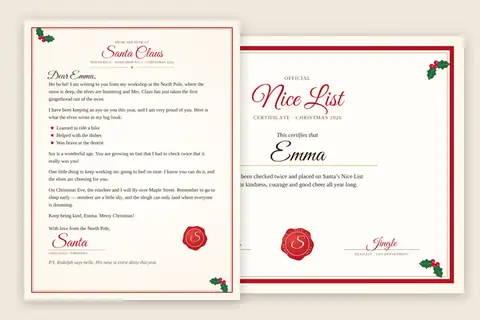
Type your child’s first name, then what went well this year, one thing per line, the way you would say it: Learned to ride a bike, Helped with the dishes, Was brave at the dentist. Santa lists them under “Here is what the elves wrote in my big book”. Add their age, the street Santa flies over and one thing to keep practicing if you like; every optional field you leave empty simply drops its sentence.
Pick how Santa writes:
| Voice | What it sounds like | Best for |
|---|---|---|
| Warm and classic | Gingerbread in the oven, the big book, “keep being kind” | most children |
| Short, for little ones | Five short lines in bigger type | ages 2 to 5, read aloud |
| Funny, with elf news | Candy-cane counts, Dasher’s loop-the-loops, reindeer years | children who are starting to wonder |
Then pick the paper look (North Pole red, old parchment, snowy blue or an ink saver in black and white) and download the PDF. The preview above is exactly what prints.
What makes it feel real?
Children notice details. The letter carries a letterhead (“From the desk of Santa Claus, North Pole, Workshop No. 1”), Santa’s handwriting for the greeting and the signature, a wax seal with an S, and holly in the corners. It names things only your child did, which is what makes a letter from Santa believable; a template with a blank line for the name never quite manages that.
A few ways to deliver it:
- In the stocking on Christmas morning, folded in thirds like real mail.
- With the reindeer food on Christmas Eve; the reindeer food bag toppers print from the same kind of page.
- As an answer to the letter your child wrote: the Christmas wish list maker prints their letter to Santa, and this one is the reply.
The letter is one piece of that evening; the Christmas page lays out the rest of the season’s printables and what to start when.
For the presents the morning brings, the photo gift tags guide walks the tag job: the sizes, the sheet count, and what a sheet costs.
What should a letter from Santa say?
Keep it about the child, not about the presents. Three specific good things from this year carry more magic than a long paragraph, and one gentle “keep practicing” line is enough. Mention a wish only if it will really be under the tree; the field says so, because a letter that hints at a gift that never comes does more harm than no letter.
Printing tips
Print at 100 percent, “actual size”, so the border sits evenly. Plain paper is fine; ivory or slightly heavier paper (about 120 g/m², 32 lb bond) feels like the real thing. The certificate prints on its own landscape page, so it can go into a frame or onto the fridge while the letter stays in its envelope.
Questions
Is the letter from Santa really free?
Yes. Type the details, look at the preview and download the PDF; no account, no email address, no watermark. The letter and the certificate are drawn in your browser.
What can I personalize?
The child's first name, their age, the street or town Santa flies over, up to four things that went well this year, one thing to keep practicing, and a wish from their list if it will really be under the tree. Every field except the name is optional; an empty field simply leaves its sentence out.
What does the Nice List certificate say?
'Official Nice List Certificate, Christmas 2026. This certifies that' (the child's name) 'has been checked twice and placed on Santa's Nice List for kindness, courage and good cheer all year long.' It is signed by Santa and by Jingle, the head elf, and carries a North Pole seal. Untick the box if you only want the letter.
Which paper should I print it on?
Plain printer paper works. Thicker paper (about 120 g/m², or 32 lb) or ivory paper makes it feel like real mail from the North Pole. Print at 100 percent, not fit to page, so the border sits evenly on the sheet.
Can I print it in black and white?
Yes, choose 'Ink saver (black and white)' under Paper look. The holly, the seal and the border are drawn as outlines on white, which costs almost no ink.
Is anything I type uploaded?
No. The words are put together and the pages are drawn inside your browser, and the PDF is assembled on your device. Nothing you type is sent anywhere.