On this page
- What is a photo memory game?
- How do you make a memory game with your own photos?
- How many cards fit on one sheet — and how many pairs should the game have?
- What are the best pictures for a memory game?
- How do you print the cards so the game actually works?
- Should you buy the game, build it online, or print it at home?
- Questions
A memory game is a deck of pairs: every photo on exactly two cards, all of them face down, and players turn two over at a time hunting for a match. Made from your own photos — the grandchildren, the wedding guests, the dog — it becomes the game people linger over after dinner. The making is the catch: a printed set from a photo service sells at $18.99–$26.10 (checked 28 September 2026), the free online makers end in a screen instead of paper, and the craft tutorials start with a circle punch and a jar of Mod Podge.
There is a third route. The generator at the top of this page turns 6 to 12 of your photos into real card sheets — 12 square cards per page, a cut border around every card, uniform backs so the photos stay hidden — computed and printed entirely at home. This guide walks that route: which photos to pick, how many pairs to make, and the print settings that decide whether the game works. Every number below comes from the tool’s own layout, computed in September 2026 — not estimated.
What is a photo memory game?
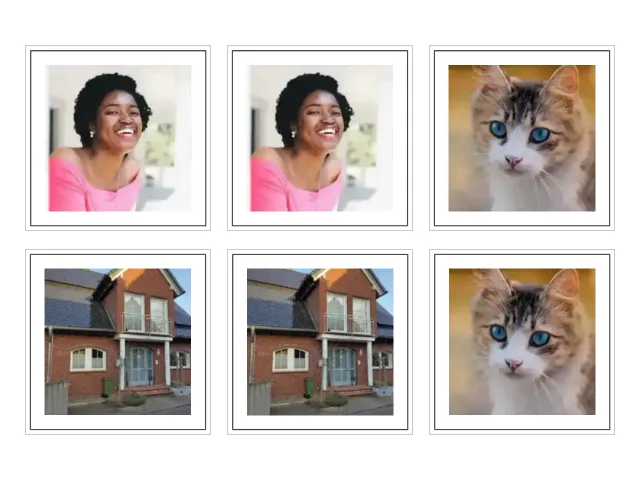
The classic match-a-pair game with your pictures in it. In the version this page makes, 12 to 24 cards lie face down and each photo appears on exactly two of them. A turn flips two cards: a match stays open, a miss flips both back. Whoever holds the most pairs when the table is clear wins.
Nobody needs those rules explained twice, which is why the game travels across generations — a four-year-old with six pairs, a table of teenagers, grandparents whose cards are faces from their own albums. The deck is the difficulty: more pairs, harder game. The wedding kids’ table is one of its regular jobs — Wedding kids’ table activities you can print at home builds the whole table around a deck like that. At Thanksgiving the game works the kids’ table the same way — what to put on the kids’ table plans that table end to end, from the coloring pages to the place cards.
How do you make a memory game with your own photos?
- Pick 6 to 12 photos. One clear subject near the middle of each — a face looking at the camera, a pet, a house, a favourite toy. The crop on every card is a square from the centre, so the middle of the photo is what stays.
- Drop them into the generator above (or on the memory game maker page). Each photo becomes a pair, all pairs are shuffled onto card sheets, and the preview shows exactly what prints. Nothing is uploaded at any point.
- Download the PDF and print at 100 percent — “actual size” in the print dialog, never fit-to-page. With card backs on (the default), print the whole file double-sided and flip on the long edge; a one-page how-to sheet prints last.
- Cut along the solid borders and deal. Scissors are fine; a paper trimmer is faster for 24 cards.
From photo folder to a dealt game: minutes for the making, one quiet coffee for the cutting.
How many cards fit on one sheet — and how many pairs should the game have?
The sheet math is the tool’s own, read from its layout: every card is a 62 × 62 mm square in a 3 × 4 grid with 6 mm gaps, centred on the page. Three cards and two gaps measure 3 × 62 + 2 × 6 = 198 mm of A4’s 210 mm width; four rows and three gaps measure 4 × 62 + 3 × 6 = 266 mm of its 297 mm height. US Letter (215.9 × 279.4 mm) holds the same grid. Twelve cards, one sheet, exactly — and because every photo needs two cards, the photos-to-sheets sum is simple:
| Photos (pairs) | Cards | Sheets |
|---|---|---|
| 6 | 12 | 1 |
| 8 | 16 | 2 |
| 12 (the maximum) | 24 | 2 |
(Computed from the generator’s sheet assembly, September 2026.)
How big the game should be depends on who plays it. Our suggestion, not a researched rule: ages 3–4 are happy with 6 photos, ages 5–6 with 8, and ages 7 and up can handle the full 12 — a 24-card game that fills two sheets. Every child is different; start small and add pairs when a game ends with the child asking for another round.
What are the best pictures for a memory game?
Faces looking at the camera, a pet, one house, one toy — anything with the subject near the middle works, because the card crop is a centred square and the sides of a wide photo go. Group shots lined up across the frame can lose the person at the edge; if that happens, crop the photo first in any phone app and add the cropped version.
Old photographs make the best decks — faces from decades back, the house as it was, the car everyone argues about — but mend them before they become cards: the scratch remover fills creases from the surrounding picture, the faded photo color restorer measures how far the colours drifted and slides them back, and the full sequence is on the restore old photos page. All three run in the browser like the game maker. The oldest faces of all are often still on film — frames nobody ever printed — and the guide What do you do with a box of old photo negatives? walks that box from strip to printable photo for free.
One deck, three generations of pictures, is the game people keep after the party.
How do you print the cards so the game actually works?
Two settings and one paper choice decide it:
- 100 percent, “actual size”, never fit-to-page. Fit-to-page shrinks every card a little — and never by exactly the same amount. Cards cut at slightly different sizes are tellable from the back, and a memory game with tellable backs is broken in a way nobody announces. This is the single most important setting on the page.
- Double-sided, flip on the long edge. The back sheet sits right behind its front sheet in the PDF, and the grid is centred and symmetric, so every star back lands exactly behind its card. No duplex printer? Print the back sheets separately and glue, or use thicker paper and leave the backs plain — uniform blank backs work almost as well.
- Paper around 160 to 200 g/m² (light card) so the photos do not show through from behind. Plain printer paper is fine for a test round. A mono printer loses nothing but colour.
The how-to sheet that prints last carries these same steps, so the person at the printer does not need this page open.
Should you buy the game, build it online, or print it at home?
All three routes exist, and the honest differences are price, uploads and your afternoon:
| Route | What you get | What it costs | The honest catch |
|---|---|---|---|
| Photo print service (Shutterfly, YourSurprise, Paper Culture) | sturdy printed cards, done for you | $18.99–$26.10, sales from $12.49 (checked 28 September 2026) | your photos go to their servers, delivery takes days, a re-print is a new order |
| Online game maker (Puzzel.org, Interacty, Educaplay) | a memory game that plays on a screen | free to freemium | the result is a hosted link, not paper — and the uploads are still required |
| Craft route (the tutorial blogs) | photos glued to wooden discs, sealed — a real keepsake | an afternoon and craft supplies | print, punch, glue, seal is a project, not a printable |
| Print at home (the generator above) | cut-ready card sheets with uniform backs | paper and ink, minutes | home cards are paper, not laminated board — card sleeves fix that if it bothers you |
Buy when the gift must arrive finished; build online when nobody owns a printer; print at home when the photos are of children, the game is for tonight, or one more re-print should cost one sheet. The routes are not rivals — the table is the whole answer.
More printables from the same camera roll: gift tags with your photo inside (the gift tags guide walks its print arithmetic the same way), an advent calendar from 24 photos, and the whole shelf on the photo gifts page.
Every card size, grid and sheet count above is read from the photo memory game generator’s own print layout, computed September 2026. Prices are from the memory-game SERP read of 28 September 2026 (Shutterfly, YourSurprise, Paper Culture, PrinterStudio listings).
Questions
Can I create my own memory game for free?
Yes — the generator on this page is free, needs no account and prints as many games as you like; the only cost is paper and ink. Photo services charge $18.99–$26.10 for a printed set (checked 28 September 2026).
How many pairs should a memory game have?
Start with 6 pairs for ages 3–4, 8 for ages 5–6 and the full 12 for ages 7 and up. That is our suggestion from the sheet math, not a rule — the best size is the one the child still wants to replay.
Do I need a special printer or cardstock?
No — any home printer works, including a black-and-white one. Thicker paper around 160 to 200 g/m² helps the photos not show through from behind, but plain paper is fine for a first game.
Can I make the game without a duplex printer?
Yes. Print the back sheets separately and glue them behind the front sheets, or use thicker paper and leave the backs plain white — uniform blank backs work almost as well as printed ones.
Can adults and grandparents play a photo memory game?
Yes — more pairs make it harder, and photos from different decades make it personal. A game from the wedding pictures and the grandchildren in one deck is a family-reunion table in itself.
Are my photos uploaded anywhere?
No — the cards, the shuffle and the PDF are computed in your browser, no request carries a photo, and closing the tab erases everything. That promise matters most on this page: these are usually photos of children.